By Qomvia, 14 min read
Key takeaways
AI assistants send fewer but better visits, and GA4 hides many of them in referral or direct traffic. AI assistants now answer the question before anyone clicks a result, so the visits you can measure are only part of the AI story.
- GA4 records visits, not answer exposure: a referral session is different from a mention or citation in an answer.
- Use the documented source tag carefully: OpenAI says ChatGPT referral URLs include
utm_source=chatgpt.com. - Search Console has its own boundary: Google includes AI Overview and AI Mode activity in the Web search type reporting.
- Bing AI Performance measures citations: Microsoft lists citation and grounding-query metrics, not ranking or authority.
- Server logs show requests: a crawler request does not prove that a page appeared in an answer.
What does it mean to track AI traffic in GA4?
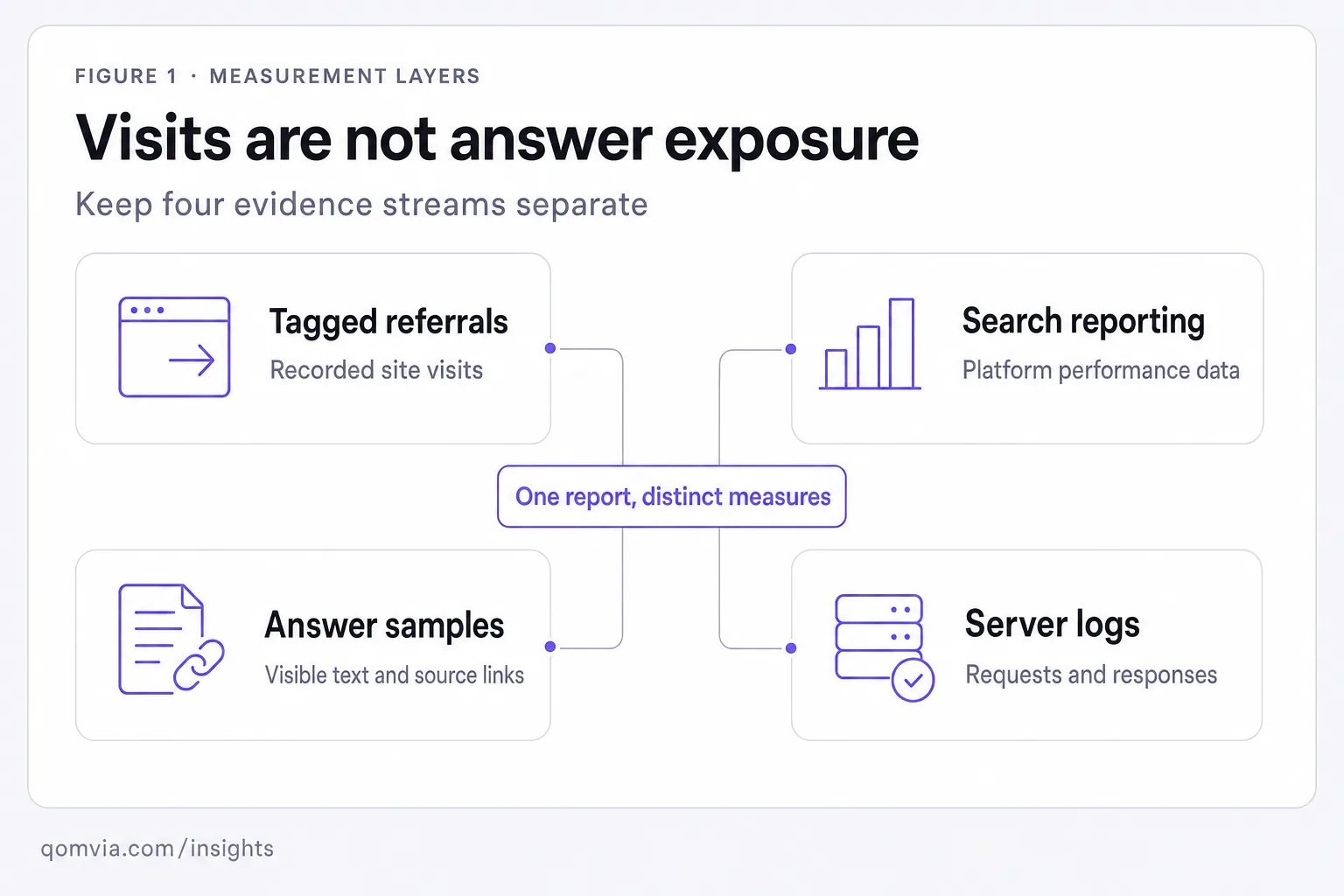
Tracking AI traffic in GA4 means identifying visits that arrive through tagged or referrer-bearing links associated with answer products, then reporting those sessions with their limits. It does not measure every answer impression, mention or citation. A complete measurement plan keeps analytics visits separate from answer samples, search-platform reporting and crawler requests.
The phrase “AI traffic” can blur several events. A person may read an answer without clicking, click a source and arrive with a campaign tag, return later through a bookmark, or visit a page after a user-requested fetch. A server can log a crawler request without a human session. Each event belongs in a different dataset and needs its own definition.
Use a two-ledger method. The visit ledger records analytics sessions and outcomes that occur on the site. The answer ledger records the question, surface, answer text and source links. Connect the ledgers when a shared identifier exists, but do not infer a complete journey when it does not. For the broader metric design, see how to measure AI search visibility.
How can GA4 identify ChatGPT referral sessions?
Use the recorded UTM value
Start by checking the incoming landing-page session rather than searching for a single universal source label. Review the traffic acquisition dimensions available in the property and inspect the source and medium values that actually arrive. If the organization uses a custom campaign convention, document its exact scope and do not assume that every assistant applies it.
Validate the path from landing page through analytics processing. A redirect can remove query parameters, consent settings can affect collection, and a client-side navigation can alter what appears in reports. Compare a controlled test visit with the resulting session record, while keeping test traffic out of the business reporting view when the property's configuration allows it.
Do not classify a visit from a vague referrer alone when the source is ambiguous. Preserve the recorded value and create a separate unknown or other category rather than assigning it to a familiar assistant. Review the classification rule with analytics owners so a later change in referral patterns does not silently rewrite historical interpretation.
UTM parameters are a convention that a campaign owner can add to a destination link; they are not a universal signal automatically attached to every AI-originated visit. If a business controls the link, use a documented naming scheme and verify that redirects retain it. If it does not control the link, keep attribution limited to what the request and analytics record actually show.
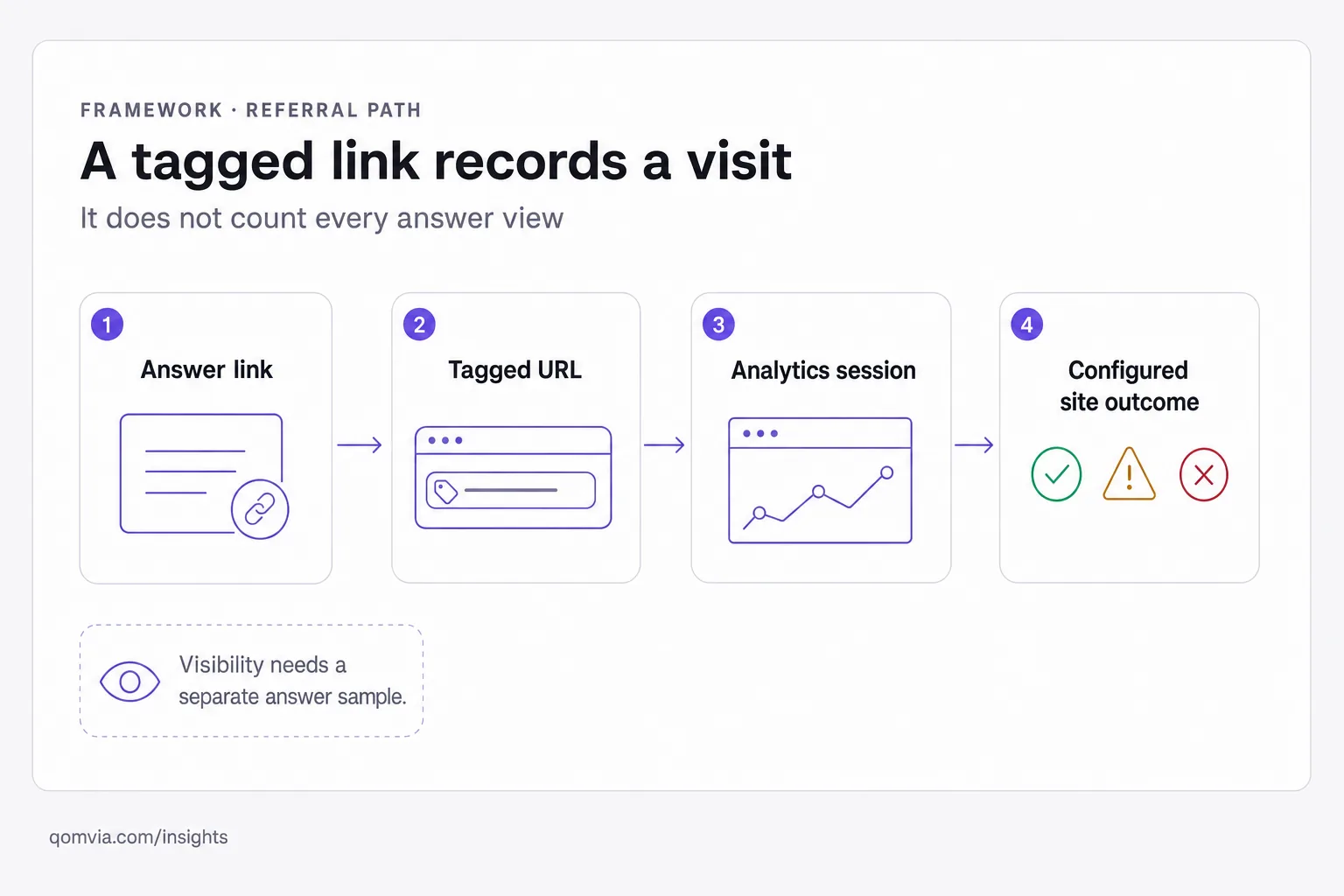
OpenAI's publisher FAQ says ChatGPT automatically includes the UTM parameter utm_source=chatgpt.com in referral URLs. This gives a site owner a concrete value to look for in analytics. It identifies a tagged visit, not the number of times a page appeared in an answer and not every visit influenced by a prior answer view.
Start with a focused report or exploration that filters for the exact source value. Preserve the landing page, session source and medium fields that your property records. Test the filter on a known tagged visit when one is available. If redirects or a consent flow remove campaign parameters, correct that behavior before comparing periods. Keep a note of the filter definition so another analyst can reproduce it.
A custom channel group can help organize these sessions, while a source-matching expression can include values observed in the property. Treat the expression as a maintained rule rather than a universal catalog of AI referrers. For the documented tag, a narrow match can use ^chatgpt\.com$ against the source value. Add another host or value only after verifying that it appears in your own collection and recording why it belongs in the group.
Keep branded and non-branded visits distinguishable if the business question requires it. A tagged landing-page session can be useful for understanding which content people choose after opening an answer link. The absence of a tag is not evidence that no answer exposure happened. Shared links, browser navigation and a later direct visit can break the observable chain between an answer and an analytics session.
Validate the source value in the analytics interface before creating a permanent rule. Campaign fields may be displayed differently across reports, and a filtering mistake can capture unrelated traffic or miss the exact tag. Start with the raw observed source, compare it with the landing URL and note the property configuration. If the value is normalized or rewritten, document that transformation so the report can be reproduced.
Do not build an expansive regular expression from guesses about which domains assistants might use. A broad rule can collect search engines, social referrals or unrelated traffic under the same channel label. Add one verified source at a time, keep the exact matching expression in the metric dictionary and review it when a new value appears. A conservative channel is easier to trust than an impressive but ambiguous total.
Check the redirect path from the source URL to the landing page. A campaign parameter can be lost when a redirect, canonicalization rule or client-side navigation replaces the address. Test the route with and without consent choices according to your privacy setup. Fix parameter preservation only in ways that comply with the property's consent and data-governance requirements.
How should Search Console AI activity be reported?
Keep platform reporting separate
Google says AI Overviews and AI Mode activity is included in the Search Console Performance report under the Web search type. That is the reporting boundary available for those Search features. It is not a separate count of all answer visibility across assistants, product surfaces or off-site conversations.
When reviewing a change, keep the page set, query context and date range clear. Compare the Search Console view with site analytics only after naming what each system records. A Search result interaction and an on-site session are related but not identical events. The aggregate report should not be described as a full transcript of which page was cited in every generated answer.
Use page-level review to add meaning to aggregate movement. If a page's search performance changes, inspect the content and the source context before attributing the change to an AI feature. Google describes query fan-out and says its AI features use existing Search eligibility, but the reporting view does not disclose every source selection decision. Keep the claim about what the report contains separate from a hypothesis about why it moved.
Keep the Search Console export labeled with its search type and the query or page dimensions you used. If the report is later joined with analytics, write down the join key and the limits of the match. The same URL can appear in Search reporting without a visit, and a session can arrive by a route that is not represented in the comparison. A joined table is a convenience, not a single source of truth.
Avoid describing Search Console activity as a complete list of cited pages across all AI products. The documented reporting applies to Google Search's AI features within the Web search type. Keep other answer products and non-search assistants in their own measurement rows, even if the business report places them on the same page.
What can Bing AI Performance add?
Microsoft announced AI Performance in Bing Webmaster Tools as a public preview. The feature describes citations across Microsoft Copilot, AI-generated summaries in Bing and selected partner integrations. It reports total citations, average cited pages per day, grounding queries and page-level citation activity. These measures add a platform-side view that a referral report cannot provide.
Microsoft explicitly says the metrics do not measure ranking, authority or importance. A cited page count is therefore not a rank position, a quality score or proof of commercial impact. The grounding-query view can help a publisher see which query contexts accompany citations, while the page-level view can help locate which URLs appear. Interpret each output at that level.
Include the preview status and product coverage in the report. The announcement describes specified Microsoft and partner experiences, not all AI search products. Do not combine those citations with Google Search Console data or GA4 sessions into one total. A cross-channel dashboard can place the measures side by side, but the definitions and observation windows should remain visible.
Name the Microsoft experience in each report rather than using a catch-all label. A citation from a grounding query and a citation displayed in another surface may have different context for the publisher. Preserve the page-level and query-level evidence that the feature exposes, then review whether the cited page supports the associated subject. A citation metric reports presence; editorial review determines whether the source is useful.
Keep a version note for the reporting feature and scope you used. A public preview can change its interface or documented coverage. Save the source statement that informed the report and revisit it when a metric appears to move unexpectedly. Do not silently compare a later product scope with an earlier one as though the observations were collected on identical terms.
| Dataset | What it can show | What it does not establish |
|---|---|---|
| GA4 referral source | Tagged visits and configured on-site activity | All answer views or citations |
| Search Console Web type | Google Search performance reporting that includes AI features | Every assistant's source selection |
| Bing AI Performance | Specified citations, pages and grounding queries | Ranking, authority or importance |
| Server access logs | Requests, user-agent labels and responses | That a request influenced an answer |
| Answer sample | Saved response text and visible source links | All product users or every possible answer |
How do server logs fit into AI traffic analysis?
Server logs help answer operational questions: which URL was requested, when, what response was returned and which user-agent label appeared. They can help identify blocked requests or repeated fetches. Keep raw requests separate from human analytics sessions, and follow your organization's retention and privacy rules when handling log data.
A user-agent string is an asserted label. Depending on the provider and your verification setup, it may not be enough to authenticate a request. Record the source IP and edge decision where policy allows, then compare with the provider's published guidance. Do not treat every unfamiliar crawler as a recognized answer engine or loosen a firewall rule because a request claims a familiar name.
Use log fields to diagnose the request, not to infer an answer impression. Status code, response size, path, cache state and edge action can show whether a page was returned or challenged. They do not establish what an assistant later did with the content. Keep any crawler classification tied to the verification process your security team has approved.
Control access to raw logs and remove or mask data that is not necessary for the investigation. A user-requested fetch can include a sensitive URL or query string. Follow existing privacy retention rules before building an AI-specific dashboard. A technically rich dataset is not automatically appropriate for broad marketing use.
A crawl is not a citation. A successful fetch establishes that a request received a response at that time; it does not show that the URL was selected or shown to a person. To evaluate the answer route, save product-level answers and source links. To evaluate visits, use analytics. To investigate access, use logs. This division avoids turning an infrastructure signal into an unsupported business result.
How can a team build a defensible report?
Preserve the query or segment definition used to produce each report. If the interface, filters or channel grouping changes, save the updated definition and note the break in interpretation. A screenshot of a chart can be useful for a presentation, but the saved settings and underlying records are needed to reproduce the result.
Add a glossary that explains each traffic label in the team's own configuration. Define the date range, attribution rule, session scope and known blind spots. When a campaign convention or channel grouping changes, record the effective date instead of applying the new rule to old data without explanation.
Show measured visits separately from answer observations. A GA4 session can establish that an analytics property recorded a visit under its current configuration. A source sample can establish that a page appeared in a saved answer. Neither measurement substitutes for the other. Keep the collection method, date range and unresolved attribution gaps next to the reported result.
For question-level sampling and mention-rate definitions, see the AI share of voice framework. For how a search product presents cited pages, compare how ChatGPT search works. These separate measures help teams avoid using referral sessions as a proxy for answer visibility.
Name the owner for each report field. Analytics should own event and source definitions; a content team can validate landing-page purpose; product or engineering can investigate redirects and tagging. When a report combines these perspectives, state who validated each part and when. That context lets a reader distinguish observed data from the team's interpretation.
Write a metric dictionary before building a dashboard. Define what counts as a tagged referral, which Search Console view is being used, what Bing AI Performance reports and how answer samples are coded. Include the source system, scope, date window and known blind spots. If an executive asks for “AI traffic,” show the component measures rather than collapsing them into an undefined number.
Use a consistent page and question set for recurring analysis. Keep the exact prompt wording, surface and locale alongside each answer sample. Record when a prompt or product mode changes. A small manual review can check whether a source supports its adjacent answer claim and whether a tagged visit reached the expected page. This makes the report useful for choosing corrections, not just describing movement.
Include a “what this means” line for each measure. For example, a tagged referral count can help assess visits from links that preserved a known source tag; it cannot estimate all exposure. A page-level citation report can identify URLs in a provider's stated coverage; it cannot rank the page across the internet. A log sample can reveal a block; it cannot prove a page was surfaced to a person.
When a leadership team asks for one headline number, answer with the decision it needs to make. If the decision concerns acquisition, show tagged sessions and configured outcomes. If it concerns whether the page is represented, show citation observations and answer reviews. If it concerns crawl access, show verified requests and responses. Several honest measures can support one decision without being collapsed into a false total.
Use Qomvia's AI monitor to inspect answers to tracked questions and its Site monitor to review public readiness. The feature inventory does not list Copilot, Bing AI Performance or Google AI Overviews as measured models. Use each first-party platform report for the data it exposes, and use Qomvia only within the documented scope. For answer-versus-visit definitions, see AI search visibility measurement.
How Qomvia covers what GA4 cannot see
GA4 sees the clicks; Qomvia shows the answers that never produced one: whether ChatGPT, Gemini and Grok named you and who they named instead.
The free scan runs all 26 checks of the agent-readiness score in about a minute and lists every failing check with a copy-paste fix; the free Site monitor re-scans weekly, no signup for the score. The AI monitor then asks your buyers' questions to ChatGPT, Gemini and Grok every day and shows whether you are named, which rival is named instead and which sources the models used. Qomvia Market and the MCP server take it one step further, letting agents act on the recommendation. Sign up free or see plans and pricing.
Sources and further reading
Questions
- How do I track AI traffic in GA4?
- Filter for verified referral values such as OpenAI's documented
utm_source=chatgpt.com, then report sessions separately from answer visibility and crawler requests. - What does utm_source=chatgpt.com mean?
- OpenAI says ChatGPT automatically adds this UTM parameter to referral URLs. It can identify tagged visits, not every answer impression or influence.
- Does Search Console include AI Overviews?
- Google says AI Overviews and AI Mode activity is included in Search Console Performance reporting under the Web search type.
- What does Bing AI Performance measure?
- Microsoft describes citation, cited-page and grounding-query metrics for specified experiences. It says these are not ranking, authority or importance measures.
- Can server logs show whether an AI answer cited my page?
- Logs can show a request and response, but a crawler fetch is not proof that a page appeared in an answer. Save answer samples and source links for citation review.
- Can GA4 measure zero-click AI exposure?
- A session report measures visits. It cannot count an answer view that did not produce a recorded site session, so use a separate answer-sampling method for visibility.
Score your own site against the rubric this is written from.
Is your site agent-ready?
Free score against the same rubric, in under a minute.
Sign up free to keep the fixes and track the score.
AI monitor
PreviewHow often each model names your site across 11 tracked questions.